The LifeRun Belle W for seniors with arthritis should be evaluated around the movements a person actually needs to perform every day, not around a generic claim that one device is “easy” for everyone. We designed the Belle W as a lightweight, wrist-worn mobile personal emergency response system, but arthritis, reduced grip strength, finger stiffness, tremor, and limited dexterity can affect each person differently. The practical question is whether the wearer can comfortably put it on, keep it on, activate the help button, hear and speak through it, and manage charging.
That is why we recommend a hands-on fit check before relying on any wearable medical alert device. The Belle W weighs 1.1 ounces with the wrist strap, includes a changeable wristband, uses a dedicated emergency call button, provides built-in two-way voice communication, and can be paired with optional fall detection. Those features can reduce the number of separate objects a senior has to handle, but they do not eliminate the need to confirm that the device suits the individual user.
What Seniors With Limited Hand Dexterity Actually Need From a Medical Alert Device
Limited hand dexterity can affect more than the emergency button. A senior may have difficulty fastening a wristband, pressing and holding a control, positioning a device on a charger, or manipulating a small accessory. We look at the whole routine because a medical alert device is only useful when the wearer can keep it available and use it consistently.
Start With the Emergency Call Button
The Liferun Belle W uses a dedicated call button that the wearer presses and holds to request assistance. For someone with arthritis, that means the most important test is simple: can the person reliably locate, press, and hold that button without pain or excessive effort? A family member should not assume that a larger-looking control is automatically accessible. Hand strength, thumb movement, sensation, and joint stiffness vary widely.
Practice the Motion Before Depending on It
We recommend practicing the activation motion during setup and again after the wearer becomes familiar with the device. A practice routine can reveal whether the senior naturally reaches the button with the thumb or another finger, whether the wrist position is comfortable, and whether clothing interferes. If the movement is difficult, that is useful information to discuss with our team before treating the Belle W as the right fit.
Built-In Two-Way Voice Reduces Extra Hand Movements
Once an emergency call is connected, the Belle W uses its built-in speaker and microphones for two-way voice communication. The wearer does not need to pick up a separate handset just to speak with the monitoring center. For a person whose hands are painful or stiff, reducing extra device handling can matter. The user still needs to be able to hear and communicate effectively, so families should test audio comfort as part of setup.

How Fall Detection Changes the Dexterity Question
Optional fall detection can add another way for an alert to reach the monitoring center, and the Belle W specifically includes fall detection with a user cancellation option. This can be relevant when a fall makes it difficult to reach or press the button. However, automatic fall detection should never be treated as a substitute for manual activation because no fall-detection technology should be assumed to detect every event.
Manual Activation Should Still Be the Primary Skill
If the wearer is able to press the call button after a fall or another emergency, we want that action to remain familiar. Families can practice where the button is, how the press feels, and what happens after activation. Fall detection is an additional layer, while the dedicated call button remains an important direct way to request assistance.
User Cancellation Matters for Accidental Events
The Liferun Belle W includes fall detection that provides an additional way to request help when a fall is detected. A wearer who is able to respond can cancel an event that does not require emergency assistance. For a person with dexterity limitations, families should make sure the cancellation process is understood during setup rather than waiting until an accidental activation occurs.
Charging and Wristband Handling Deserve Their Own Test
The Belle W rechargeable battery can last up to seven days in Ready Mode, while the product specifications state one to two days in Always On mode. Longer intervals between charging can reduce how often a senior has to handle the charging cradle, but battery life depends on operating mode. We do not recommend building a routine around the maximum figure without confirming the device mode and the wearer’s actual charging habits.
Look at the Full Charging Motion
The device uses charging pins and a charging cradle. A useful accessibility check includes picking up the device, aligning it correctly, placing it on the charger, and removing it again. A family member may choose to help with charging if finger stiffness or reduced grip makes that task frustrating. The goal is a routine the wearer can actually sustain.
Consider Whether the Wristband Is Comfortable to Manage
The Belle W has a changeable wristband and is designed to be lightweight. Comfort can encourage consistent wear, but fastening and removing any wrist-worn device may still be challenging for some people with arthritis. Test the strap at the time of setup. If another supported wear option is easier, discuss that choice with our team and consider how it affects features such as fall detection.
A Practical Family Checklist Before Choosing the Belle W
We suggest treating accessibility as a short real-world trial rather than a label. Have the intended wearer perform the exact actions they would need during a normal week and during a simulated help call.
Check the Actions That Matter Most
Confirm that the senior can comfortably wear the device, identify the call button, press and hold it, hear the monitoring specialist, speak toward the device, recognize the LED status lights if they use them, and manage charging with or without family support. If any step causes pain or confusion, adjust the routine before relying on it.
Use Our Product and FAQ Pages to Compare Features
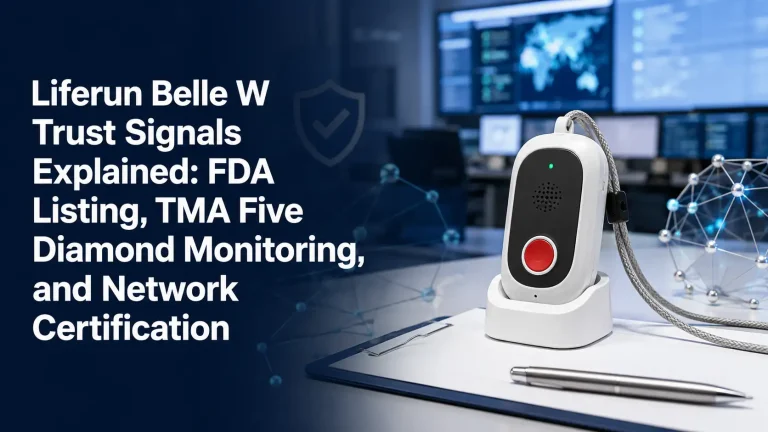
You can review the current Belle W specifications and our medical alert FAQs before deciding. Our device overview also shows the Belle W controls, speaker, microphones, LED indicators, charging pins, and changeable wristband so families can understand the everyday interactions involved.
Choosing Accessibility Over Assumptions
At LifeRun, we want the device to fit the person, not force the person to adapt to an unsuitable routine. The Belle W has several characteristics that may simplify emergency access, including wrist wear, a dedicated call button, two-way voice, optional fall detection, and multi-day battery operation. Arthritis and limited dexterity are individual, however, so the correct decision comes from testing the actual movements the wearer must perform.
If you are comparing options for a parent or another family member, call us at 1-800-421-3366 or review our current products online. We can help you focus on the device features and daily-use steps that matter for the person who will actually wear the system.
Frequently Asked Questions
Can a senior with arthritis use the LifeRun Belle W?
Many seniors may be able to use it, but arthritis affects people differently. The key is whether the wearer can comfortably press and hold the call button, manage the wristband, hear and speak through the device, and handle charging.
How much does the Belle W weigh?
The Belle W weighs 1.1 ounces with the wrist strap attached and 0.7 ounces without it.
Does the Belle W require a smartphone to speak with the monitoring center?
No. The Belle W has built-in speaker and microphones for two-way voice communication.
Can fall detection help if a senior cannot press the button?
Optional fall detection can initiate an alert when a fall is detected, but it should not be assumed to detect every fall. Manual button activation remains important whenever the wearer is able to use it.
How often does the Belle W need charging?
LifeRun lists up to seven days of battery life in Ready Mode and one to two days in Always On mode. Actual charging routines should be based on the selected operating mode and device status.